Kubernetes - ConfigMaps
ConfigMaps Deep Dive: Creation Methods, Consumption Patterns, and Lifecycle Tips
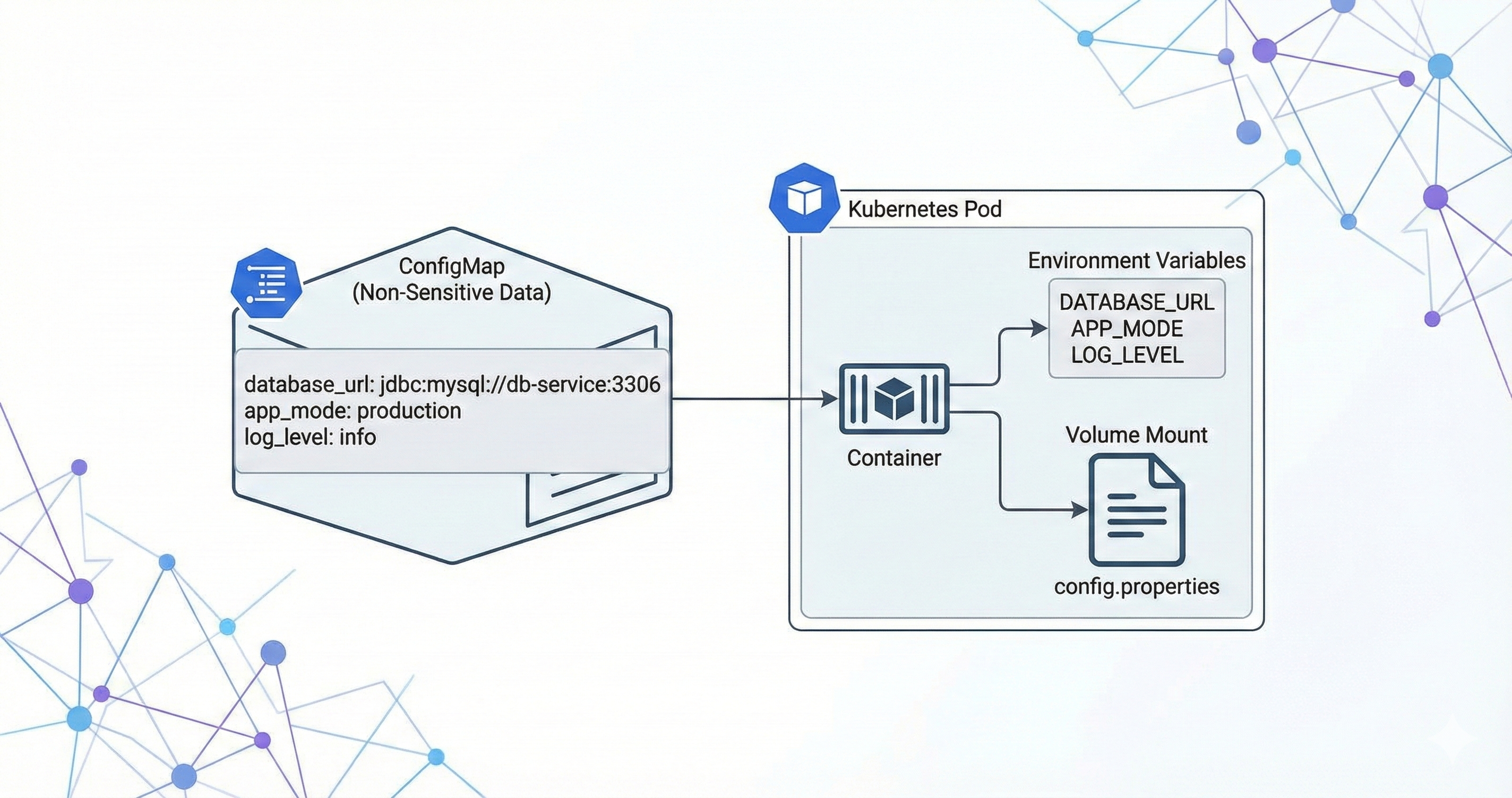
We have already explored Volumes in Kubernetes in the previous blog. We understood how pods can store and share data using volumes.
But let’s pause and think for a moment 🤔
What if we just want to pass configuration values to a Pod? For example:
Database URL
Application mode (dev / prod)
Feature flags
External service endpoints
We don’t want to hardcode these values inside the container image. Because configuration changes frequently, but images should remain stable. So how do we handle this in Kubernetes? 👉 This is exactly where ConfigMaps come into the picture.
In this blog we will explore
What is ConfigMaps
How and Where to use it
Creation Methods: Understanding the various ways to build ConfigMaps using
kubectlliterals, files, or YAML manifests.Consumption Strategies: Discovering how Pods actually "read" this data, whether through environment variables or by mounting them as files.
Lifecycle & Updates: Exploring what happens when configuration changes and how to handle updates without breaking your services.
What is a ConfigMap? 📦
A ConfigMap is a Kubernetes Object is used to store non-sensitive configuration data as key-value pairs. It allows you to:
Decouple configuration from container images. This means you can use the exact same image in development, staging, and production, simply by swapping out the ConfigMap associated with it.
Pass environment variables to pods
Provide configuration files to containers
Update configs without rebuilding images
In simple words:
ConfigMap = A way to inject configuration into your Pod dynamically.
How ConfigMap Works 🔍
A ConfigMap stores configuration as:
Key-value pairs
Entire configuration files (like an
nginx.conforsettings.py)Environment Variable
Then Kubernetes allows you to: Inject them as environment variables or Mount them as files inside a container.
Remember that Configmaps are not intended for sensitive information like passwords or API keys—for those, we use Secrets
Complete Internal Flow Summary:
kubectl sends ConfigMap definition to API Server
API Server validates and stores ConfigMap in etcd
ConfigMap now exists as a cluster object
Pod referencing ConfigMap is scheduled to a node
kubelet detects Pod and fetches ConfigMap
kubelet injects ConfigMap into container (env or volume)
Container starts
Application consumes configuration
ConfigMap - Creation Methods
Method 1: Literal Key-Value Pairs 🔑
The first method is using kubectl command and creating a config map using literals directly from terminal
# Syntax
kubectl create configmap <map-name> --from-literal=<key>=<value>

# Example
kubectl create configmap app-settings --from-literal=ui_color=blue --from-literal=debug_mode=true
When to use this method:
You should use Literal Key-Value Pairs when quick testing/debugging is needed. If you want to:
Quickly toggle a feature flag
Change a log level
Test a temporary configuration
Small, Simple Configuration
While literals are great for quick flags, real-world applications often have dozens of settings stored in configuration files (like .properties, .env, or .yaml). Kubernetes allows you to take an entire file and shove it into a ConfigMap in one go.
Method 2: From a File 📄
In this method instead of passing individual Key Value pairs we can pass the whole file as an input. This is very useful when we have a need to pass a config file to the Container image.
When you use the --from-file flag, Kubernetes uses the filename as the key and the file contents as the value.
Imagine you have a file named connection.conf with this content:
# Filename: connection.conf

db_host=prod-db.example.com
db_port=5432
To configure this file in Config map we will use below command
kubectl create configmap db-config --from-file=connection.conf
Inside the ConfigMap, it looks like this:
Key:
connection.confValue: (The entire multiline string of the file)
When to use this Method:
This is similar to the above literals the only difference is that here we can pass the whole file. This method is also useful for short term testing or for temporary change
Method 3: Declarative YAML 📝
This is the widely used industry standard method for declaring ConfigMaps. All the ConfigMaps are written in a YAML file in declarative way and then we apply it. This gives us an option to maintain desired state and also help us to follow GitOps. This allows us to track changes in Git (Infrastructure as Code).
A ConfigMap in YAML looks like this:
apiVersion: v1
kind: ConfigMap
metadata:
  name: test-config
data:
  # Simple key-value pair
  log_level: "INFO"
  DB_TYPE: "postgres"
  # Multiline configuration file
  nginx.conf: |
    server {
      listen 80;
      server_name localhost;
    }
To apply this to our K8 cluster we use below default apply command
kubectl apply -f <filename>
When to use this Method:
This is the most commonly used best practice method. Apart from short term testing it is recommended to use Declarative YAML method while creationg configmaps.
We understood the methods of creating config maps now lets explore how we can consume it.
ConfigMap - Consumption Strategies
Whenever you create a configmap using any of the above method the configmaps are stored in the cluster now your application needs to read it. There are two methods to consume the configmaps
Environment Variables: Good for individual settings (like
DB_TYPE).Volume Mounts: Good for configuration files (like
nginx.conf).
Method 1: Environment Variables:
In this method we will fecth the ConfigMap and use it as an Environment variable in the pod.
Let's take the below Pod Definition example
apiVersion: v1
kind: Pod
metadata:
  name: sample-app-pod
spec:
  containers:
    - name: sample-container
      image: nginx:latest
      env:
        - name: DATABASE_KIND   # Environment variable inside container
          valueFrom:
            configMapKeyRef:
              name: test-config   # ConfigMap name
              key: DB_TYPE         # Key inside ConfigMap
When to use this Method:
When your config maps is just are just Key Value pair and your applications can consume it via environment variable you can use this method.
Method 2: Volume Mounts:
In this method we will mount the ConfigMaps as a volume. So the keys in the configMap will be file name in the Volume and value will be content inside the file.
Example:
# weather-config.yaml

apiVersion: v1
kind: ConfigMap
metadata:
  name: weather-config
data:
  city: "Chennai"
  temperature-unit: "Celsius"
  app.properties: |
    forecast.days=5
    refresh.interval=30
# weather-pod.yaml

apiVersion: v1
kind: Pod
metadata:
  name: weather-app-pod
spec:
  containers:
    - name: my-container
      image: nginx:latest
      volumeMounts:
        - name: config-dir              # Must match volume name below
          mountPath: /etc/config        # Files appear here inside container
          readOnly: true
  volumes:
    - name: config-dir
      configMap:
        name: weather-config            # ConfigMap name
How the config maps are stored in this method ?
Kubernetes will read the weather-config ConfigMap, convert each key into a file, mount those files inside /etc/config
Inside your container you will be seing the Config map as file like this : /etc/config/city , /etc/config/temperature-unit
Everything is a "File" in a Volume:
[CREATION]: Whether you create a ConfigMap from a literal (
--from-literal) or a file (--from-file) or using manifest files, Kubernetes stores them the exact same way key-value pairs[CONSUMPTION]: But, when you mount a ConfigMap as a volume, Kubernetes treats every key as a filename and every value as the content of that file. It doesn't care if the original source was a literal string or a 500-line config file.
Remember the difference between creating a config maps(which we discussed in previous section) and consuming the configmaps(which we are discussing now). This above point is when you consume configMaps as volume
There is a small catch here 👀. Whenever you mount a ConfigMap as a volume, Kubernetes mounts it on the specified path inside the container.
👉 But here is the important part:
When a volume is mounted to a path, any existing content in that path will be hidden. Only the data from the latest mounted volume will be visible.
🔎 Let’s Understand With Example
Assume that you have two configMaps named xyz-config and weather-config . If you want to mount both in the same path mountPath: /etc/config, then
The second mount
weather-configwill override the first oneOnly the latest mounted config map will be visible
Other files in that path become unavailable to the pod
🤔 Why Is It Like This?
This is Kubernetes’ default behavior. When you mount a volume to a path,
- Kubernetes overlays that volume on that directory. The original content is hidden. This ensures clean and predictable file mapping. Also improves isolation and avoids accidental file mixing (security + consistency reasons).
So what is the solution if I want to mount all configMaps to the specific Path Or map my ConfigMap to a specific path and also use other contents from the path. This is where a new parameter comes in called subPath
subPath
If you want to mount multiple ConfigMaps to the same directory without hiding each other, you can use subPath
👉 what
subPathtells Kubernetes:Mount this specific file inside the directory, not override the entire directory.
Example - without subPath
volumeMounts:
  - name: xyz-volume
    mountPath: /etc/config
  - name: weather-volume
    mountPath: /etc/config # This will override the previous one ❌
Example - with subPath
apiVersion: v1
kind: Pod
metadata:
  name: multi-config-pod
spec:
  containers:
    - name: my-container
      image: nginx:latest
      volumeMounts:
        - name: weather-volume
          mountPath: /etc/config/weather.properties
          subPath: weather.properties
          readOnly: true

        - name: xyz-volume
          mountPath: /etc/config/xyz.properties
          subPath: xyz.properties
          readOnly: true

  volumes:
    - name: weather-volume
      configMap:
        name: weather-config

    - name: xyz-volume
      configMap:
        name: xyz-config
🧠 Important Note
When using normal mount you only specify directory path.
mountPath: /etc/config. This is because by default, when you mount a volume to a path, Kubernetes creates a directory at that path. If you mount it exactly at/app/static/theme.css, that path will become a directory, and your file would actually live at/app/static/theme.css/theme.css. This is why when you are not using subpath you have to define only the path without filenameBut when using
subPath, You must specify the complete file path including filename.mountPath: /etc/config/weather.properties.This is because now you are mounting a specific file, not the whole directory.
ConfigMap - Lifecycle & Updates 🔄
In this section, let’s understand something very practical:
👉 What happens when you update a ConfigMap?
👉 How does Kubernetes handle those updates?
👉 Does your application automatically see the changes?
The behavior actually depends on how you consume the ConfigMap. There are two main consumption strategies which we discussed, as Environment Variables and as Volume Mounts. Let's see what happens on both clearly
🧪 Lifecycle of ConfigMap as Environment Variable
When you consume a ConfigMap as an environment variable, and later you update the ConfigMap, The running Pods will NOT see the changes.
🤔 Why is this? - Because, ConfigMap values are injected into the container only at startup. Once the container starts Environment variables are set. They become part of the container’s runtime. Kubernetes does NOT re-inject updated values.
So even you edit your config map using kubectl edit configmap my-config the values of ConfigMaps will be updated but your pods will not use the updated values.
✅ So What Should You Do? You must restart the Pod. There are multiple ways to do it
Delete the Pod (ReplicaSet will recreate it)
Trigger a Deployment rollout
Once the container restarts, the updated ConfigMap values will be injected.
📂 Lifecycle of ConfigMap as Volume Mount
Now this is interesting 👀
When you consume a ConfigMap as a Volume Mount, updates behave differently. When you update the ConfigMap, Kubernetes automatically updates the files inside the mounted volume. Yes — without restarting the Pod.
🤔 But there is a Catch? - The catch is in your application design.
Let's take a example, Your app reads /etc/config/app.properties , It reads it only once during startup. Now you update the ConfigMap. The file inside the container gets updated. But your app still uses old values. Because your application is not re-reading the file.
🧠 What Should Be Done? - If you consume ConfigMap via Volume, Your application should Watch the file for changes or periodically reload configuration or support dynamic configuration refresh Otherwise, the update exists at the file level — but not at the application level.
🛡️ Immutable ConfigMaps
Now let’s talk about something advanced and powerful.
Imagine, You have 300 Pods all are consuming the same ConfigMap via Volume Mount. They are watching for changes.
Whenever you update that ConfigMap, Kubernetes API server must notify all watchers, the control plane processes multiple update events, this increases API server load. It may cause unexpected behavior if files update mid-process
Now think practically, What if this configuration NEVER changes or changes very rarely ?
In such cases, Kubernetes gives you something called Immutable ConfigMaps
You can mark a ConfigMap as immutable. This tells Kubernetes that the values in the configMaps will not change. So that Kubernetes will not watch these configMaps.
Example:
apiVersion: v1
kind: ConfigMap
metadata:
  name: static-config
immutable: true # This is the magic
data:
  api_key: "12345"
✅ Benefits of Immutability
Safety: Prevents accidental configuration changes that could break production.
Performance: Kubernetes stops "watching" these files, reducing the load on the API server.
❓ But What If I Need to Change an Immutable ConfigMap?
Good question 😉. Once a ConfigMap is marked as immutable, you CANNOT Modify the data, Remove the immutable flag, Edit it directly, Kubernetes strictly prevents this.
You could delete and recreate it, but that is risky. If a Pod restarts during the split second where the ConfigMap doesn’t exist Pod will fail to start.
The Expert Way: Versioning (Rolling Forward Pattern):
Instead of editing the old ConfigMap, create a new one
Create New: You create a new ConfigMap named
static-config-v2with your updated database URL.Update Deployment: You edit your Deployment manifest to point to this new name.
Rollout: Kubernetes sees the Deployment change and automatically performs a rolling update, creating new Pods with the new config and terminating the old ones safely.
At this point, you might have one more doubt. If I’m using versioned ConfigMaps and I have 100 applications, do I need to manually update all 100 Deployment files every time the config changes?
Yes… technically you could. But that would be Painful 😅, Error Prone, Not Scalable. This is where tools like Kustomize come into play.
⚙️ How Kustomize Solves This Problem
Kustomize helps you manage Kubernetes configurations in a smarter way. When you use Kustomize to generate ConfigMaps:
It automatically hashes the content.
It appends that hash to the ConfigMap name.
Example:
- Instead of
static-configit creates hashed value something like thisstatic-config-m9t8f5c92k
We will explore Kustomize deeply in another blog (because that itself deserves a full discussion 😄).
📋 Putting It All Together: The Expert Checklist
Now we have explored ConfigMaps in detail:
What they are
How they are consumed
Update behavior
Immutable pattern
Let’s finish with a simple, practical checklist. Because in production, the real question is: When should I use what?
Feature | Environment Variables | Volume Mounts |
|---|---|---|
Best For | Small flags, single strings | Large config files, multi-line data |
Update Behavior | Requires Pod restart | Updates automatically (eventually) |
App Logic | Easy ( | Medium (must watch file changes) |
Safety | High (static during runtime) | Lower (files can change mid-process) |
Performance Impact | Minimal | API server watches (unless immutable) |
Production Strategy | Simple apps | Dynamic / reloadable systems |
Common Doubts
If My Config Never Changes, Why Use ConfigMap At All why do we need Immutable?
At first glance, this seems logical as I also had the same doubt. If it never changes, why not just hardcode it inside the application?
But here’s why ConfigMaps still matter.
Separation:
Even if configuration never changes, we still separate Application Code and Configuration, why because Same image can run in Dev, QA, Prod. Only configuration changes between environments. ou don’t rebuild image for every small config variation
So Even if production config rarely changes, it is still environment-specific. That separation is the core design principle.
Image Immutability Principle:
In Kubernetes world, Container images should be immutable. If we bake config inside the image any changes to the config maps will force us to rebuild the image which increment the image version for small change.
practical list of common ConfigMap-related errors
ConfigMap Not Found Errors:
Error: configmap "<Configmap name>" not found
Why it happens: Typo in name, Wrong namespace, ConfigMap not created before Pod, Deleted accidentally
Fix: Verify namespace: kubectl get configmap -n <ns> , Ensure order: ConfigMap must exist before Pod starts
Wrong Namespace Issue:
Why it happens: Very common mistake. ConfigMap is created in default namespace as we forget to mention the namespace
Fix: Create ConfigMap in the same namespace as Pod.
Key Not Found Error
Error: couldn't find key DB_HOST in ConfigMap
Why it happens: Wrong key name, Case mismatch (db_host vs DB_HOST), Key deleted during update
Fix: Make sure you are using same KEY across the namespace. Validate it with Configmap when you are consuming it
Pod Stuck in CreateContainerConfigError
Error: CreateContainerConfigError
Why it happens: Missing ConfigMap, Missing key, Invalid reference. This usually means Kubernetes cannot inject the ConfigMap.
Fix: Validate the configmap in correct namespace and the names are matched across the deployments. Validate Configmap is created or not
Environment Variable Not Updating
Error: You update ConfigMap. But app still shows old value.
Why it happens: Env variables are injected only at container startup.
Fix: Restart Pod - kubectl rollout restart deployment app
Volume Mount Not Updating Immediately
Error: You update ConfigMap. File inside container still shows old content for some time.
Why it happens: Update propagation delay, Kubelet sync period (usually ~1 min)
Fix: This is normal behavior. No fix needed
Application Not Picking Updated File
Error: File updated but app still behaves same.
Why it happens: Application reads config only at startup. Kubernetes updated file but app never reloaded it.
Fix: This is an application design issue, not Kubernetes issue. Need to design app to check config maps periodically or take changes whenever happens
subPath Does NOT Auto-Refresh
Error: If we use subPath then configMap does not auto refresh
Why it happens: Because subPath mounts a single file copy not the live symlink.
Accidentally Overriding Directory
Error: When you mount configmap as Volume it hides other files in the volume
Why it happens: This is the default behaviour of Kubernetes to have clean mount and saftey.
Fix: If you want to mount the configMap where you also needs to use other files from volume use subPath to mount configmap.
Large ConfigMap Size Limit
Error: etcd request too large
Why it happens: ConfigMap size limit: ~1MB.
Fix: Makesure you manage size of configmap in right way. ConfigMaps are not meant for Huge Binaries or Large Json datasets
Watch Load on API Server
Error: API server getting overloaded
Why it happens: Hundreds of Pods watching a frequently updated ConfigMap: High API server load, Performance degradation
Fix: Use immutable configmap for static configs
🧠 Production-Level Issues (Advanced)
These are not syntax errors but architectural mistakes:
Using ConfigMap for dynamic runtime feature toggles (bad design)
Updating ConfigMap frequently in high-scale clusters
Not versioning production config
Editing ConfigMap directly in production (breaks GitOps)
Using subPath when expecting dynamic updates
Conclusion
ConfigMaps are a simple, powerful Kubernetes primitive for decoupling non-sensitive configuration from container images. They let you store key-value configuration outside of your images and supply those values to Pods either as environment variables or as mounted files — giving you flexibility to use the same image across environments and change configuration independently.
Key takeaways:
Use ConfigMaps for non-sensitive, environment-specific values (use Secrets for sensitive data).
Create ConfigMaps via
kubectlliterals, files, or declarative YAML manifests depending on your workflow and need for version control.Consume ConfigMaps as environment variables for small, simple values or mount them as files when applications expect file-based configs.
Be mindful of update behavior: mounted files are updated automatically (with caveats), while env-based values require Pod restart; manage updates via rollout restarts, immutable ConfigMaps, or reloader sidecars/controllers when appropriate.
Follow best practices: keep configs declarative (GitOps), name and label ConfigMaps clearly, avoid embedding large binaries, and consider using immutable ConfigMaps for stable deployments.


